Surge Protector vs Power Strip
Look behind your TV or under your desk. There is probably a long plastic box with a row of outlets, a red switch, and a tangle of cords. Now the real question: is it protecting your gear, or just giving it more places to plug in? Many people assume every outlet strip guards against power spikes. Most cheap ones do not. Understanding the surge protector vs power strip difference can save you from losing a $1,500 TV or a gaming PC to one bad storm.
The two look almost identical on a store shelf. But inside, they are built for different jobs. This guide explains what each one does, how to tell them apart, and what to look for when you buy.
What Is a Power Strip?
A power strip is an extension cord with extra outlets. It takes one wall outlet and turns it into four, six, or more. Many have an on/off switch and a built-in circuit breaker that trips if you pull too much power through it.
That is all it does. A basic power strip offers no protection against voltage spikes. If a surge comes down the line, it passes straight through the strip and into whatever you have plugged in.
Power strips are fine for:
- Lamps
- Phone chargers for older, cheap phones
- Holiday lights
- Desk fans
- Simple kitchen gadgets
What Is a Surge Protector?
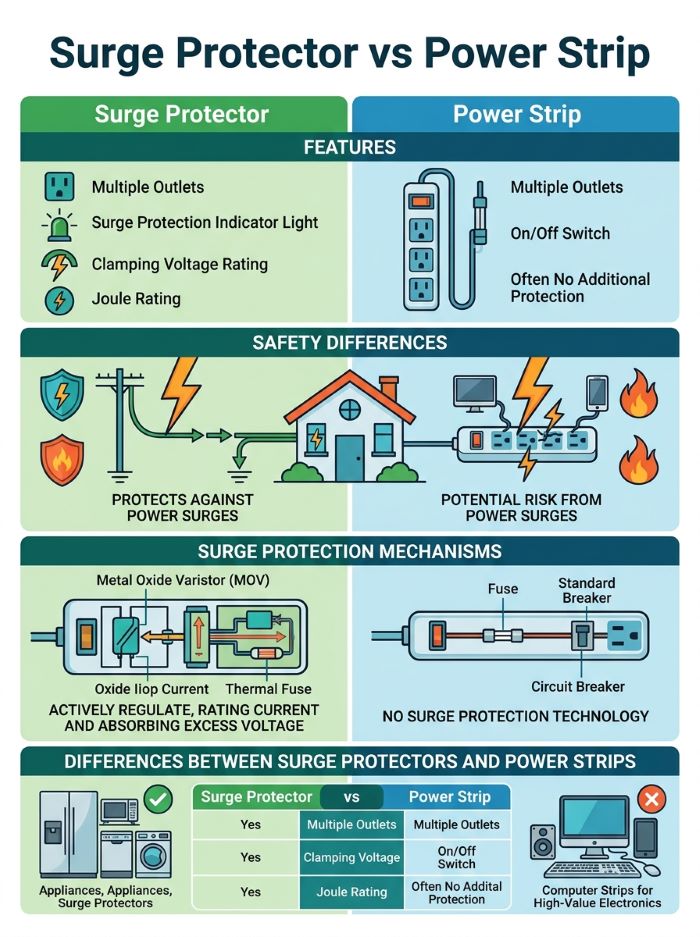
A surge protector also gives you extra outlets, but it adds a key part: a system that diverts excess voltage away from your devices. Most use parts called metal oxide varistors, or MOVs. When voltage climbs above a safe level, the MOVs send the extra energy to the ground wire instead of into your electronics.
Power surges happen more often than most people think. Big ones come from lightning strikes or problems on the power grid. Small ones happen many times a day when large appliances like air conditioners, refrigerators, and dryers cycle on and off. These small surges do not destroy devices in one hit, but over time they can wear down the circuits inside.
A surge protector is the right choice for:
- Computers and laptops
- TVs and soundbars
- Game consoles
- Routers and modems
- Printers and monitors
- Home office and studio equipment
Surge Protector vs Power Strip at a Glance
| Power Strip | Surge Protector | |
|---|---|---|
| Main job | Adds outlets | Adds outlets and blocks voltage spikes |
| Protects electronics | No | Yes |
| Key safety listing | UL 1363 | UL 1449 |
| Joule rating | None | Usually 600 to 4,000+ |
| Price range | About $5 to $20 | About $15 to $80+ |
| Lifespan of protection | Not applicable | Wears down over time |
| Best for | Lamps, fans, basic chargers | Computers, TVs, consoles, networking gear |
How to Tell Them Apart
Since they look so similar, check the box or the label on the back of the unit. A true surge protector will list:
- A joule rating. If there is no joule rating, it is not a surge protector.
- A UL 1449 listing. This is the safety standard for surge protective devices. A plain power strip will usually only list UL 1363.
- A “protected” indicator light. Most surge protectors have a light that shows the protection is still working.
Words like “surge suppressor” or “surge protected” on the packaging help, but the joule rating and UL 1449 listing are the real proof.
The Specs That Matter on a Surge Protector
When you shop, three numbers tell you most of what you need to know.
Joule Rating
The joule rating tells you how much energy the protector can absorb before it fails. A higher number means more protection and a longer life.
- Up to 1,000 joules: Fine for small devices like phone chargers and lamps that you still want covered.
- 1,000 to 2,000 joules: A good fit for a computer, printer, or router.
- 2,000 joules and up: Best for home theaters, gaming setups, and expensive equipment.
Clamping Voltage
Clamping voltage, also called voltage protection rating (VPR), is the level at which the protector starts to divert power. Lower is better. Look for 330 volts, the lowest rating under UL 1449. Ratings of 400 or 500 volts still work, but they let more voltage through before kicking in.
Response Time
Response time shows how fast the protector reacts to a surge. Most good models react in one nanosecond or less. Faster is better, but almost any quality protector is fast enough for home use.
Surge Protectors Wear Out
Here is the part many people miss. Every surge a protector absorbs uses up part of its capacity. After enough hits, or one large one, the MOVs stop working. In many models, the outlets still deliver power after this happens. The unit becomes a plain power strip, and you may never notice.
To stay protected:
- Check the “protected” light now and then. If it is off, replace the unit.
- Replace surge protectors every three to five years, or sooner in storm-prone areas.
- Replace one right away after a major surge, such as a nearby lightning strike.
- Look for models that cut power completely when protection fails. Some higher-end units do this so you know it is time for a new one.
Safety Tips for Both
Whether you choose a surge protector or a power strip, follow these rules:
- Do not daisy chain. Never plug a power strip or surge protector into another one. It can overload the circuit and create a fire risk.
- Keep high-draw appliances off them. Space heaters, refrigerators, microwaves, and air conditioners should plug straight into the wall.
- Do not cover them. Keep them out from under rugs and away from heat sources.
- Check the cord and plug. Replace any unit with frayed wires, scorch marks, or a warm feel.
- Use outdoor-rated units outside. Indoor strips are not built for moisture.
What Surge Protectors Cannot Do
A good surge protector helps a lot, but it is not a force field. A direct lightning strike on your home or power line can carry far more energy than any plug-in unit can handle. If you live in an area with frequent storms, it is still smart to unplug expensive electronics during severe weather.
Surges can also enter through cable, phone, and network lines. Many surge protectors include coaxial or Ethernet ports to cover these. For full-home coverage, an electrician can install a whole-house surge protector at your electrical panel. It works best paired with plug-in surge protectors at your most important devices.
Surge Protector vs UPS
A third option is worth mentioning. A UPS, or uninterruptible power supply, combines surge protection with a battery backup. If the power goes out, it keeps your devices running for a few minutes so you can save your work and shut down safely. A UPS costs more, but it is a smart choice for desktop computers, home servers, and network gear.
Which One Should You Buy?
The surge protector vs power strip choice is easy once you look at what you are plugging in:
- Anything with a circuit board that costs more than $50: Use a surge protector.
- Lamps, fans, and holiday lights: A power strip is fine.
- A home office with a desktop computer: Consider a UPS.
- A home theater: Pick a surge protector with 2,000 joules or more and coaxial protection.
Since a decent surge protector costs only a few dollars more than a power strip, many people simply buy surge protectors for every spot in the house. That avoids the risk of plugging a laptop into the wrong strip.
Common Questions About Surge Protector vs Power Strip
Is every power strip a surge protector? No. Many power strips have no surge protection at all. Check for a joule rating and a UL 1449 listing.
Can I plug a surge protector into an extension cord? It is best to avoid this. Plug surge protectors straight into a grounded wall outlet.
Do surge protectors work in two-prong outlets? They need a ground to send excess voltage away. In an ungrounded outlet, protection is very limited.
Does a surge protector save energy? Not by itself. Some “smart” strips cut power to devices in standby, which can trim your bill a little.
A Quick Home Audit
Take ten minutes this weekend to check every outlet strip in your home. Flip each one over and look for a joule rating and a UL 1449 label. Any strip without them is a power strip, not a surge protector. Move your most valuable electronics to a true surge protector, and save the basic strips for lamps and fans. This simple audit makes the surge protector vs power strip difference real in your own home, and it costs almost nothing. Repeat it every year so worn-out units do not slip through, and the surge protector vs power strip question will never catch you off guard.
Final Thoughts
The surge protector vs power strip difference comes down to protection. A power strip just adds outlets. A surge protector adds outlets and shields your electronics from voltage spikes, as long as you replace it when it wears out. For anything valuable, spend the extra few dollars on a surge protector with a solid joule rating and a UL 1449 listing. Knowing the surge protector vs power strip difference is one of the cheapest ways to protect the gear you rely on every day.
Key Takeaways
- A power strip only adds outlets. A surge protector adds outlets and diverts excess voltage away from your devices.
- Check for a joule rating and a UL 1449 listing to confirm a product is a true surge protector.
- Aim for at least 1,000 joules for computers and 2,000 joules or more for home theaters and gaming setups.
- A clamping voltage of 330 volts offers the best protection under UL 1449.
- Surge protectors wear out. Replace them every three to five years or after a major surge.
- Never daisy chain strips, and plug space heaters, refrigerators, and microwaves straight into the wall.
- Surge protectors cannot stop a direct lightning strike. Unplug valuable gear during severe storms.
- A UPS adds battery backup and is a smart pick for desktop computers and network equipment.