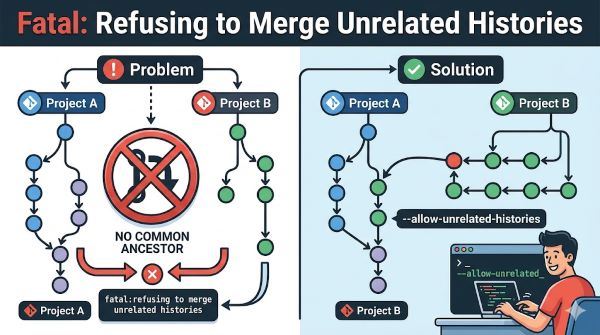
If you work with Git and encounter the error “fatal: refusing to merge unrelated histories,” you’re dealing with a common Git protection mechanism. This error happens when Git detects that two branches have no common history between them. Git refuses to merge unrelated histories to protect your code from unexpected changes or data loss.
Understanding this error and knowing how to resolve it is essential for anyone managing version control. The error message seems intimidating at first, but the solution is straightforward once you understand what’s happening behind the scenes.
Why Git Refuses to Merge Unrelated Histories
Git uses version history to track changes and understand relationships between files. When you try to merge two branches, Git looks for their common ancestor. This common point in history helps Git understand how the branches diverged and how to combine them safely.
The fatal: refusing to merge unrelated histories error occurs when Git cannot find any common history between the branches. This typically happens when you’re merging a local repository with a remote repository that has a completely different history, or when you’ve initialized two separate Git repositories and are trying to combine them.
Git displays this error as a safety feature. If Git allowed merging completely unrelated histories without permission, you might accidentally lose work or create a confusing merge situation. By refusing unrelated histories by default, Git forces you to be intentional about combining separate projects.
Common Scenarios Where This Error Appears
This error often appears when you initialize a new GitHub repository and push code that already has its own Git history. You create a local repository, make commits, then create a matching repository on GitHub. When you try to pull from the remote before pushing, Git sees two separate histories.
Another scenario involves creating a repository locally, then trying to pull from an existing remote repository with different content. The remote repository has its own history starting from an initial commit, while your local repository has a different starting point.
You might also encounter this error when merging two independent projects. Perhaps you started one project alone and later want to incorporate code from another independent project. Git sees these as separate histories and refuses the merge.
Forking a repository and then trying to merge back to the original can trigger this error if the fork was created before the original had any commits. The fork and original have no shared history.
The Git Merge Command and the Error
When you run git merge or git pull on a branch with unrelated histories, Git stops the operation and displays the error message. The git pull fatal: refusing to merge unrelated histories error specifically happens during pull operations because pull combines fetch and merge.
The git merge unrelated histories situation occurs whether you’re merging locally created branches or pulling from a remote. The error is the same because the underlying issue is the same: Git detects no common history between the branches.
Understanding the git refusing to merge unrelated histories error helps you recognize that Git is protecting you, not blocking you unnecessarily. The solution exists, but using it requires deliberate action.
Solution 1: Allow Unrelated Histories During Merge
The most straightforward solution is to tell Git to allow merging unrelated histories. You do this by adding a flag to your merge or pull command.
For merge operations, use this command: git merge –allow-unrelated-histories [branch-name]
For pull operations, use: git pull –allow-unrelated-histories origin [branch-name]
This flag tells Git to proceed with the merge even though the histories don’t connect. Git will still attempt to merge the content intelligently, combining files from both branches where possible.
After running the command with the flag, Git might open a merge editor if conflicts exist. You resolve conflicts by choosing which version of conflicting files to keep, then complete the merge.
Solution 2: Rebase Instead of Merge
An alternative approach to the git fatal: refusing to merge unrelated histories problem involves rebasing instead of merging. Rebasing replays commits from one branch onto another, which sometimes handles unrelated histories better than merging.
Use the command: git rebase –allow-unrelated-histories origin/[branch-name]
This approach creates a linear history rather than a merge commit. For some workflows, rebasing produces cleaner history. However, rebasing changes commit history, which can cause problems if other people have already pulled your commits.
Rebase works best when you’re pulling remote changes before pushing your local commits. It’s less suitable for published branches that others depend on.
Solution 3: Force Push After Resolution
In some cases, after resolving the unrelated histories merge, you might need to force push your changes to the remote repository. This happens when the remote history and your local history have diverged significantly.
Use: git push –force-with-lease origin [branch-name]
The –force-with-lease flag is safer than a regular force push. It prevents you from accidentally overwriting someone else’s changes. However, use force push carefully. It rewrites remote history, which affects other team members who have pulled that branch.
Only force push if you’re certain no one else is working on the branch, or if you’ve coordinated with your team beforehand.
Handling Unable to Merge Unrelated Histories in Repository
The error message “unable to merge unrelated histories in this repository” appears in some Git interfaces and tools. This is the same error with slightly different wording. The cause and solutions remain identical.
Some Git GUI clients or hosted Git services display the error differently. GitHub, GitLab, and Bitbucket might phrase the error uniquely, but the underlying issue is the same: the two branches have no common history.
When you encounter this error on any platform, the solutions above work regardless of the specific wording in the error message.
Best Practices to Avoid This Error
Prevention is better than troubleshooting. Following these practices reduces the chance of encountering unrelated histories issues.
Initialize repositories correctly: When starting a new project, initialize your Git repository first, then add your code. Don’t add code first and initialize Git later.
Use a shared starting point: When combining two separate projects, create a new repository, import code from both projects into it, and establish a common starting point. This prevents completely unrelated histories from forming.
Clone before pushing: When working with a remote repository, clone it first. This ensures your local repository inherits the remote’s history. Don’t create a local repository independently and then try to connect it to a remote.
Fetch before pulling: Always fetch remote changes before pulling. This lets you review what’s coming before merging it into your local work.
Communicate with your team: If you’re working on a shared repository, discuss branching and merging strategies beforehand. Clear communication prevents surprises when trying to merge.
Merging Pull Requests from Unrelated Histories
If you’re managing pull requests on GitHub or GitLab, unrelated histories can block merging through the web interface. The solution involves using Git commands locally to resolve the issue.
Check out the branch with the pull request, add the –allow-unrelated-histories flag to your merge command, resolve any conflicts, and push the result back. The pull request updates with the successful merge.
Alternatively, you can squash the commits from the unrelated history branch into a single commit and merge that. This approach works when the unrelated history commits don’t need to be preserved individually.
Dealing with Conflicts During Unrelated Histories Merge
When merging unrelated histories, Git often encounters conflicts. Conflicting sections of code appear marked in your files with conflict markers: <<<<<<< HEAD, =======, and >>>>>>>.
You manually edit these sections to decide which version of the code to keep. Delete the markers and the unwanted version of the conflicting code, keeping only what should be in the final merged version.
After resolving all conflicts, stage the resolved files with git add and complete the merge with git commit.
Understanding Git History and Commits
Learning more about how Git tracks history helps you understand why unrelated histories matter. Every commit in Git includes a reference to its parent commit. This creates a chain of commits stretching back to the initial commit.
When two branches have unrelated histories, their commit chains don’t intersect. Git cannot find a common ancestor. This is different from branches that diverged from the same point. Diverged branches share a common ancestor; unrelated histories don’t.
Visualizing commit history with git log –graph –oneline –all shows you the structure of your repository’s history. This helps you understand why two branches are unrelated.
Key Takeaways
- Fatal: refusing to merge unrelated histories is a Git safety feature that prevents merging branches with no common commit history.
- The git pull fatal: refusing to merge unrelated histories error happens when pulling changes from a remote repository that has a completely different history than your local branch.
- Use git merge –allow-unrelated-histories [branch-name] or git pull –allow-unrelated-histories origin [branch-name] to proceed with the merge despite unrelated histories.
- Git refusing to merge unrelated histories protects you from accidentally losing work or creating confusing merge situations.
- Rebasing with –allow-unrelated-histories provides an alternative to merging that creates linear history instead of a merge commit.
- Initialize repositories correctly and clone remote repositories before starting work to avoid creating unrelated histories in the first place.
- When conflicts occur during unrelated histories merges, manually resolve them by editing conflicting sections and choosing which code to keep.
- Communicate merging strategies with your team before encountering unable to merge unrelated histories situations in shared repositories.
- Force pushing after resolving unrelated histories is sometimes necessary but should be done carefully with –force-with-lease to protect others’ work.
- Understanding commit history structure and common ancestors helps you recognize why Git refuses certain merges and how to resolve them safely.