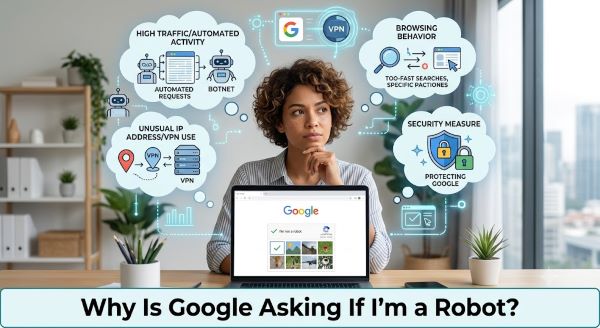
Few things are more annoying than trying to do a quick Google search and being stopped by a CAPTCHA asking you to click fire hydrants or type out distorted letters to prove you’re human. If you’re wondering why is Google asking if I’m a robot when you’re clearly sitting at your computer doing normal searches, there are specific reasons it happens and concrete things you can do to reduce how often it shows up.
What Is the Robot Check and Why Does Google Use It?
The prompt you’re seeing is called a CAPTCHA, which stands for Completely Automated Public Turing test to tell Computers and Humans Apart. Google uses it when its systems detect traffic patterns that resemble automated bot behavior rather than a person manually typing searches.
Google processes billions of searches per day. A significant portion of that traffic comes from bots, scrapers, and automated tools that overload servers and distort search data. The CAPTCHA acts as a checkpoint to separate automated tools from real users.
When Google asks if you’re a robot, it doesn’t mean it’s certain you are one. Understanding why is Google asking if I’m a robot requires knowing what signals its systems look for. It means your activity has crossed a threshold that triggered the check.
Common Reasons Google Thinks You Might Be a Bot
1. High search volume in a short period
If you run many searches in rapid succession, search the same term multiple times, or use Google Search more intensively than average, you can trigger the robot check. This is the most common cause for regular users.
2. VPN or proxy use
VPNs route your traffic through shared IP addresses that many other users are also using simultaneously. Google sees a high volume of requests coming from the same IP, which looks like bot behavior. The “why is Google asking if I’m a robot” question comes up frequently for VPN users because their shared IP may already be flagged.
3. Browser extensions or automation tools
Some browser extensions automate behavior that Google’s systems read as non-human. This includes extensions that pre-fetch results, block ads in ways that modify search page requests, or interact with Google Search automatically. Developer tools and selenium-based testing tools also trigger this.
4. Malware on your device
Some malware runs hidden processes that make automated requests through your browser without your knowledge. If you’re seeing the robot check consistently and haven’t changed anything about how you use Google, malware is worth investigating.
5. Shared network IP
If you’re on a school, work, or public network where many people access Google from the same IP address, the combined volume can trigger CAPTCHAs for everyone on that network, even if your individual usage is entirely normal.
6. Suspicious request patterns
Certain search behaviors resemble automated scraping: searching for structured data, querying the same domain repeatedly, or using specific characters and operators in searches at speed. These patterns flag the system even when a human is doing them.
How to Stop Google from Asking If You’re a Robot
Sign in to your Google account
Many people ask why is Google asking if I’m a robot even when they search normally. Being signed in to a verified Google account significantly reduces how often you see the robot check. Google can use your account history and behavior patterns to verify you’re human without a CAPTCHA. Anonymous traffic is held to stricter scrutiny.
Disable or pause your VPN
If the check appears every time you search while on a VPN, the shared IP is almost certainly the cause. Switch to a different VPN server, which gives you a different IP, or temporarily disable the VPN and check whether the prompts stop.
Check for malware
Run a full scan with your antivirus software. Malwarebytes is a reliable free option for a second-opinion scan even if you already have antivirus installed. Hidden bot activity on your device can cause Google to challenge every request your browser makes.
Disable unnecessary browser extensions
Temporarily disable all extensions and search on Google. If the robot check disappears, re-enable them one at a time to identify which one is causing the behavior.
Clear cookies and cache
Old cookies associated with flagged sessions can carry the suspicion from one browsing session to the next. Clearing cookies and cache resets how Google sees your browser and often stops the prompts.
Restart your router
If your ISP assigns you a dynamic IP, restarting your router will give you a new IP address. If the previous IP was flagged by Google, a new one clears the issue immediately.
Why Does the Check Keep Coming Back?
If you pass the CAPTCHA and it keeps returning, the underlying cause is still active. Many users ask why is Google asking if I’m a robot session after session, and the answer is always the same: the trigger was never removed. Passing the check doesn’t fix the reason it triggered. You need to address the root cause rather than just clicking through each time.
The most persistent cases are usually VPN-related or extension-related. Once you identify and address the specific cause, the checks typically stop or become very infrequent for normal search use.
Does It Happen More on Certain Browsers?
Chrome users tend to see the robot check less often because Google can use browser-level signals (like Chrome’s built-in account sync) to confirm human behavior. Firefox, Safari, and other browsers don’t share that data with Google, so anonymous traffic from those browsers gets scrutinized more.
If you regularly use a privacy-focused browser with JavaScript restricted or cookies blocked, Google has fewer signals to work with and defaults to showing the check more frequently. Allowing Google’s cookies in your browser settings, even if you block others, typically reduces the frequency.
In itself, no. Google showing you a CAPTCHA is not a sign that your account has been compromised or that anything harmful has happened. It’s a precautionary check. However, if the prompt appears constantly without any change in your behavior, it’s worth scanning for malware to rule out hidden automated activity on your device.
Key Takeaways
- Google asks if you’re a robot when your traffic patterns resemble automated bot activity, not necessarily because it thinks you are one.
- The most common triggers are rapid or high-volume searching, VPN use on shared IP addresses, browser extensions that automate behavior, and malware running hidden processes.
- Signing in to a Google account reduces the frequency of robot checks because Google can verify human behavior through account history.
- VPN users see this prompt often because shared IP addresses carry the activity of many other users, which crosses Google’s bot-detection thresholds.
- If you’re wondering why is Google asking if I’m a robot every single search session, the cause is almost always a VPN, a browser extension, or malware.
- Clearing cookies, restarting your router, or switching VPN servers can resolve the issue immediately if a flagged session or IP is the cause.
- Persistent CAPTCHA prompts warrant a malware scan to rule out hidden automated activity on your device.
- Passing the check each time does not fix the underlying trigger. Identify and address the root cause to make the prompts stop.